How to pair fonts for a website: four free pairings, and the sizes that make them work
Short answer: pick one font for headlines and one for everything else, and make them different in structure (a serif with a sans, a monospace with a sans), not just in name. Before you commit, check that each font has the weights and styles you need, set both on a short type scale, load them with font-display: swap, and read the licence. Two families is enough for almost any site.
This post works through the four pairings in the Sundry Mill library, because each one teaches a different part of the job: one font with a single weight, one drawn on a pixel grid, one with adjustable axes, and one typewriter face. Every font here is free.
Step 1: give each font one job
Most pairings fail because both fonts try to do everything. Decide the jobs first:
- The headline font sets the mood. It is read in short bursts at large sizes, so it can have character: a tall serif, a pixel face, a soft wonky serif.
- The text font does the work. It is read in long runs at 16 to 18 px, in buttons, labels, menus and forms. It should be plain enough to disappear.
Then make sure they differ in more than name. Two neutral sans serifs side by side look like a mistake, because the eye notices they are different without seeing why. A serif with a sans, or a monospace with a proportional font, reads as a decision.
The four library pairings follow that rule:
- Instrument Serif and Satoshi: a tall, narrow serif with a round, plain sans.
- Departure Mono and Inter: a pixel monospace with a screen sans.
- Fraunces and Karla: a soft old style serif with a friendly grotesque.
- Courier Prime and Instrument Serif: a typewriter face for the words, a fine serif for the titles. This one flips the usual roles, which works because the content is poems and notes rather than an interface.
Step 2: check what each font actually has
A font's name tells you nothing about how many weights it ships. This is where pairings break in practice, usually the first time someone needs a bold subheading.
- Instrument Serif comes in Regular and Italic. That is all: no bold. So the pairing uses size for hierarchy and keeps the serif at 40 px and up, where its thin strokes look deliberate. A 20 px card title in Instrument Serif has no heavier weight to reach for, so those go in Satoshi.
- Satoshi runs from Light to Black, with italics, which is why it can take every job the serif cannot.
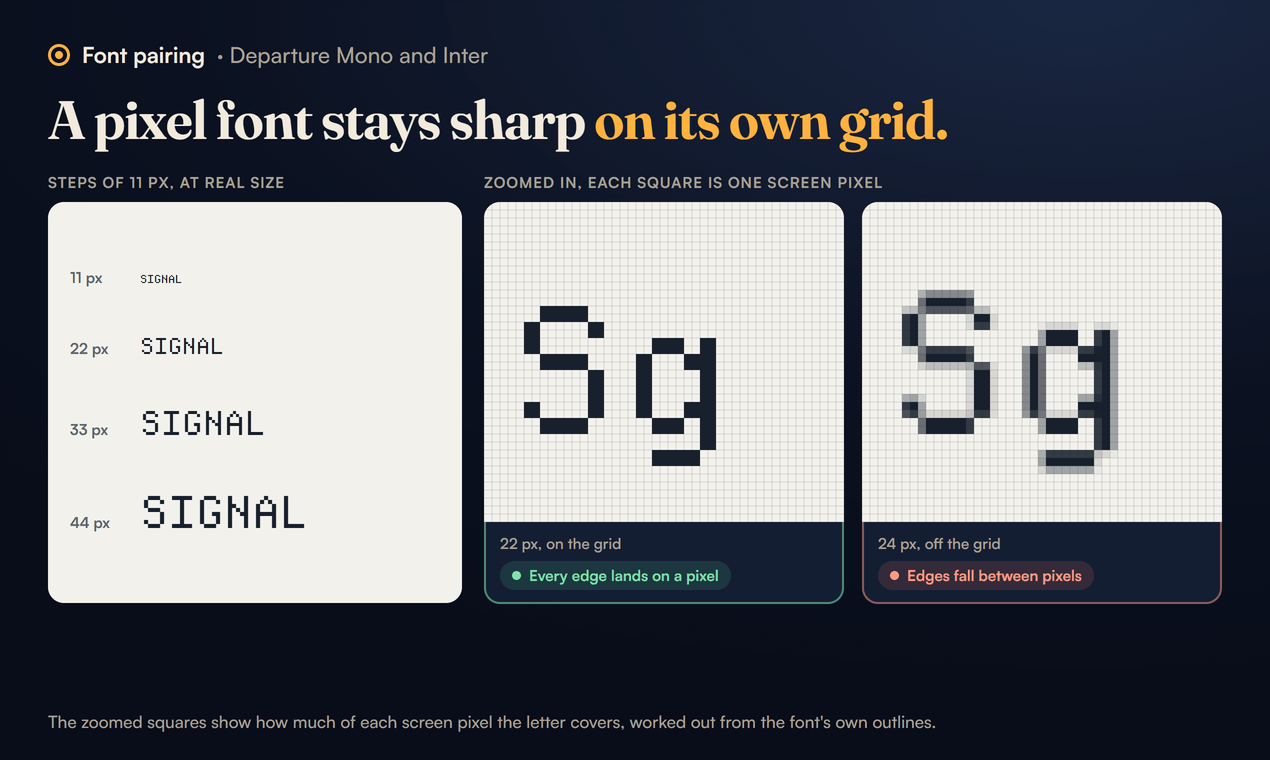
- Departure Mono has one style, Regular, drawn on an 11 pixel grid. Its maker recommends sizes in steps of 11 px (11, 22, 33, 44) for pixel sharp results. At sizes off that grid the pixel edges can land between screen pixels and look soft.
- Inter is variable from Thin to Black, so it covers every weight the pixel font lacks.
- Fraunces is a variable font with four axes. Its own notes list optical size from 9 to 144 points, weight from 100 to 900, a Softness axis for rounder forms, and a Wonky axis that swaps in leaning and bulbous letters, switched on automatically above 18 points of optical size.
- Karla runs from ExtraLight to ExtraBold, with italics.
- Courier Prime has Regular and Bold, with italics. It is Courier redrawn to look better on screen and in print.
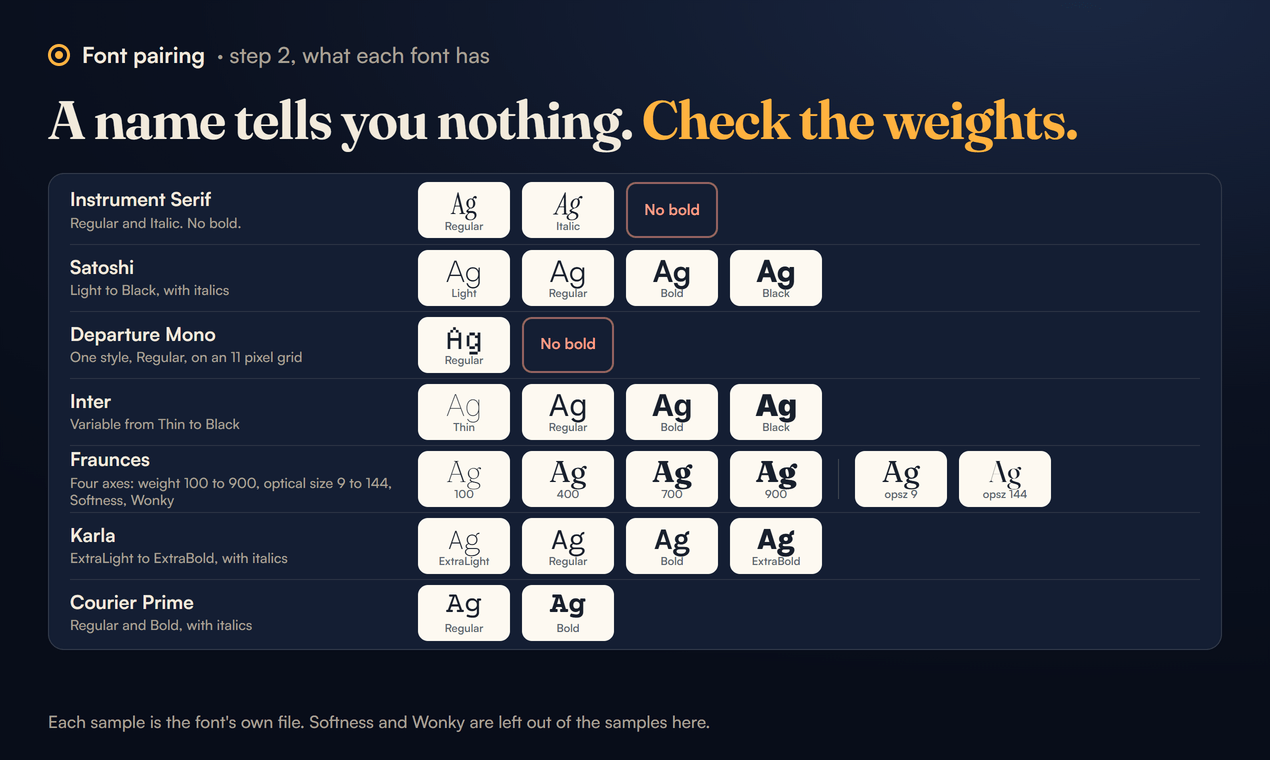
Write this list down for your own pair before you design anything. If the headline font has one weight, your design cannot depend on a bold headline.
Step 3: put both on one type scale
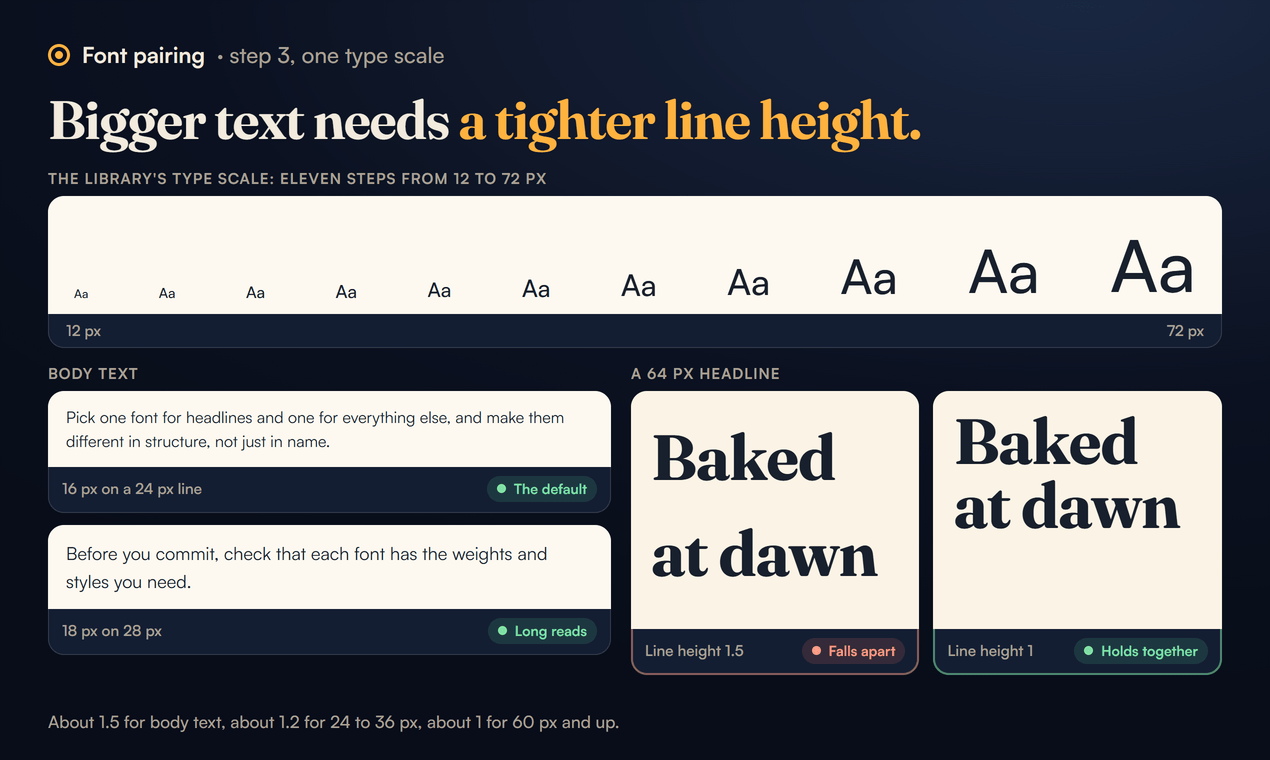
A pairing only looks right at the right sizes. The library's type scale has eleven steps from 12 to 72 px, the same steps Tailwind uses. A site rarely needs more than five of them. Three rules from it do most of the work:
- Body text at 16 px on a 24 px line, or 18 px on 28 px for long reads like a blog post.
- Line height tightens as size grows. About 1.5 for body text, about 1.2 for 24 to 36 px, about 1 for 60 px and up. A 64 px headline at a line height of 1.5 falls apart into separate lines.
- Headings can grow with the screen.
clamp()lets an h1 go from 36 px on a phone to 72 px on a big screen without a media query.
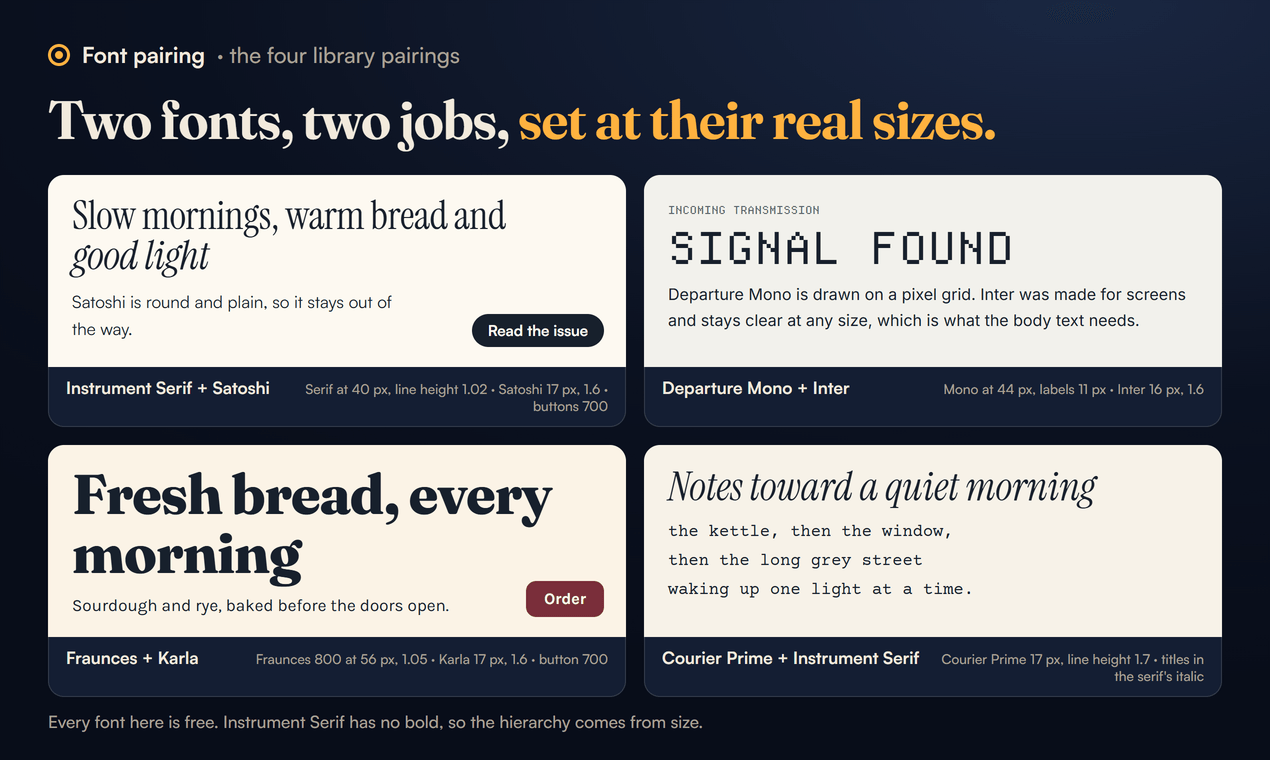
Here is how that lands for each pairing:
- Instrument Serif and Satoshi: headlines in the serif at 40 px and up with a line height of about 1.02; body in Satoshi at 17 px with 1.6; buttons and labels in Satoshi 700.
- Departure Mono and Inter: h1 at 44 px, h2 at 33 px, labels at 11 px upper case, all on the 11 px grid; body in Inter at 16 px with 1.6.
- Fraunces and Karla: headlines in Fraunces 700 or 800 with
font-optical-sizing: auto, which lets the optical size axis tighten the letters at large sizes by itself; body in Karla 400, buttons and prices in Karla 700. - Courier Prime and Instrument Serif: the typewriter face at 16 to 17 px with a generous line height of about 1.7, so it breathes like a typed page; titles in Instrument Serif Italic, a line or two long.
Two WCAG numbers are worth keeping in mind while you set the text. For comfortable reading, the AAA guidance in 1.4.8 asks for lines no wider than 80 characters and line spacing of at least one and a half times the size. And 1.4.12 asks that nothing breaks when a reader raises line height to 1.5 times the font size, paragraph spacing to 2 times, letter spacing to 0.12 times and word spacing to 0.16 times. Do not set fixed heights on text boxes and you will usually pass.
Step 4: load them without the page jumping
There are three ways to get a free font onto a page, and the library pairings use all three.
From Google Fonts, with one link for both families when you can. The Fraunces and Karla pair loads like this:
<link rel="preconnect" href="https://fonts.googleapis.com">
<link rel="preconnect" href="https://fonts.gstatic.com" crossorigin>
<link href="https://fonts.googleapis.com/css2?family=Fraunces:opsz,wght@9..144,400..800&family=Karla:wght@400;500;700&display=swap" rel="stylesheet">
Ask only for the weights you use. wght@400;500;700 is three files; the full range is more.
From Fontshare, for Satoshi:
<link href="https://api.fontshare.com/v2/css?f[]=satoshi@400,500,700&display=swap" rel="stylesheet">Self hosted, for Departure Mono, which is not on Google Fonts. Download it from departuremono.com and add:
@font-face {
  font-family: 'Departure Mono';
  src: url('/fonts/DepartureMono-Regular.woff2') format('woff2');
  font-weight: 400;
  font-display: swap;
}
font-display: swap gives the font "an extremely small block period and an infinite swap period", in MDN's words: the text shows straight away in a fallback font and switches when the file arrives, instead of staying invisible.
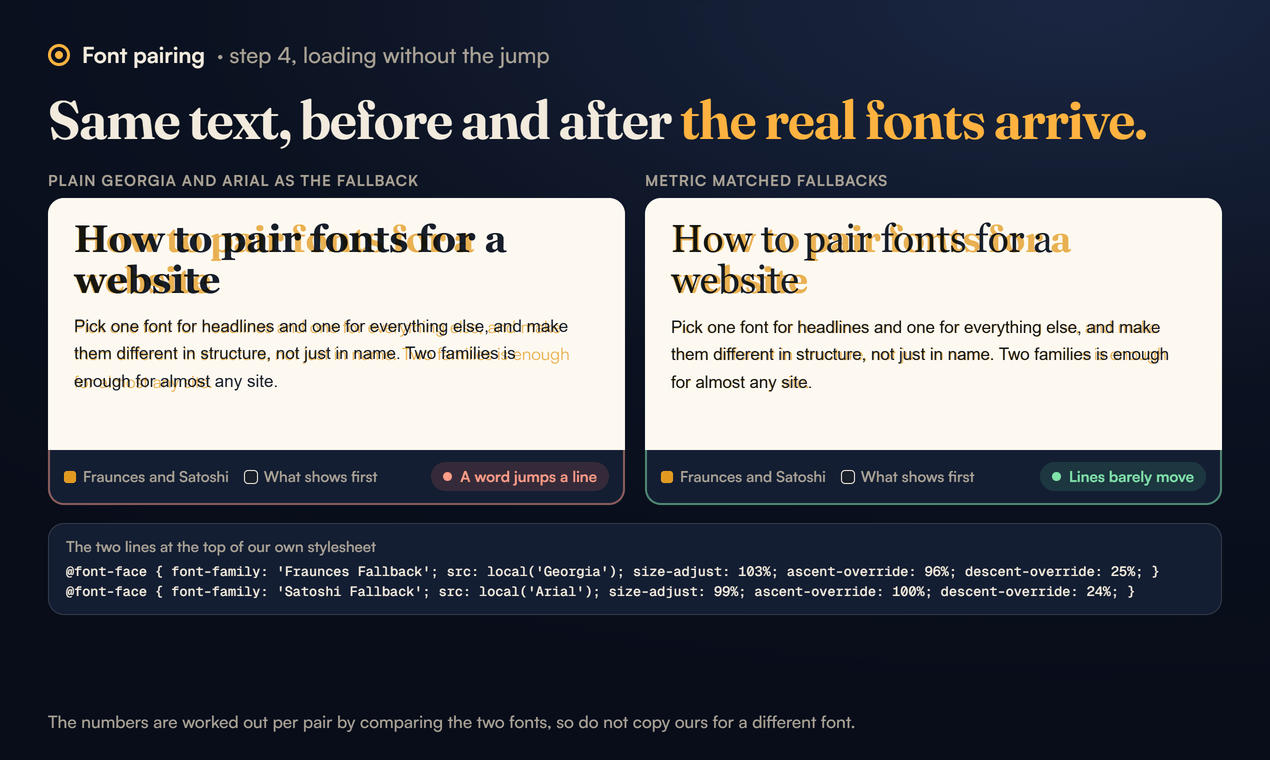
The cost of swap is a jump. The fallback is a different size, lines rewrap when the real font lands, and the page shifts under the reader. This site handles it with metric matched fallbacks. These are the two lines at the top of our own stylesheet, for Fraunces and Satoshi:
@font-face { font-family: 'Fraunces Fallback'; src: local('Georgia'); size-adjust: 103%; ascent-override: 96%; descent-override: 25%; }
@font-face { font-family: 'Satoshi Fallback'; src: local('Arial'); size-adjust: 99%; ascent-override: 100%; descent-override: 24%; }
and then the stacks name them second:
--display: 'Fraunces', 'Fraunces Fallback', Georgia, serif;
--sans: 'Satoshi', 'Satoshi Fallback', 'Segoe UI', system-ui, sans-serif;
size-adjust scales a font's glyphs and metrics by a percentage, so Georgia is drawn at 103% to take up about the same room as Fraunces, and the override descriptors line up the space above and below the text. When the real font swaps in, the lines barely move. The numbers are worked out per pair by comparing the two fonts, so do not copy ours for a different font.
Step 5: read the licence
All four pairings are free, but free comes in different licences:
- SIL Open Font License: Instrument Serif, Inter, Fraunces, Karla, Courier Prime and Departure Mono. The licence's own site says OFL fonts can be used "in books, posters, artwork, logos, and on websites" with no acknowledgement required.
- ITF Free Font License: Satoshi, from Indian Type Foundry through Fontshare. Read it before you use Satoshi in a logo or a product you sell.
One rule we keep in the library: the font pages link to the free official source and never offer the font files as downloads, even where the licence would allow it. The source is where you get the current version and the licence text that goes with it.
A worked example: a bakery home page in an hour
Here is the whole process on a real kind of page: a bakery with a hero line, three loaves with prices, and opening hours.
- Jobs. The headline font should feel warm and made by hand; the text font must make prices and hours easy to scan. Fraunces and Karla.
- Check the weights. Fraunces goes to 900, so a heavy hero line is possible. Karla has 400 and 700, enough for text and prices.
- Scale. Hero "Fresh bread, every morning" in Fraunces 800 at 56 px, line height 1.05. Loaf names in Fraunces 700 at 24 px. Descriptions and hours in Karla 400 at 17 px with 1.6. The Order button and the prices in Karla 700.
- Load. The single Google Fonts link above, with
display=swap, asking for weights 400 to 800 of Fraunces and 400, 500 and 700 of Karla. - Colour. The autumn palette: Oat Milk background, Mulled Wine text, which measures 7.06:1.
- Check. Read it on a phone at arm's length. If the loaf names feel heavier than the hero, drop them to 600. If the descriptions run past about 70 characters a line on a laptop, give the column a
max-widthof around60ch.
The CSS for the pair is short:
h1, h2, h3 {
  font-family: 'Fraunces', Georgia, serif;
  font-weight: 700;
  font-optical-sizing: auto;
  line-height: 1.05;
  letter-spacing: -0.02em;
}
body {
  font-family: 'Karla', system-ui, sans-serif;
  font-size: 1.0625rem;
  line-height: 1.6;
}
button { font-family: 'Karla', system-ui, sans-serif; font-weight: 700; }
Common mistakes
- Three or more families. Each one is another download and another voice. If you need variety, use the weights and the italic of the two you have.
- Choosing from a specimen line. "The quick brown fox" at 72 px tells you nothing about a 14 px label. Set a real paragraph, a button and a price before you decide.
- A display font for body text. A pixel font or a hairline serif at 16 px tires the eyes over a paragraph. Keep them for short things.
- Forgetting the fallback. If the font fails to load, the stack decides what people see. Name a sensible system font last in every stack.
Each library page has the specimen at several sizes, the links to the free downloads and the CSS above ready to copy. If a font there has changed its weights or licence since we checked, tell us at support@sundrymill.com.
Sources
- The four font pages in the Sundry Mill library, for each font's designer, styles and licence, and the type scale.
- Fraunces on GitHub: the variable axes, their ranges and the Wonky switch.
- Departure Mono: the font and its download.
- Google Fonts and Fontshare: where the other fonts come from.
- MDN: font-display and MDN: size-adjust.
- WCAG 2.2: success criteria 1.4.8 Visual Presentation and 1.4.12 Text Spacing.
- Open Font License: what the OFL allows.