"Windows protected your PC": what code signing costs an indie developer, and the Microsoft Store route
Short answer: the blue "Windows protected your PC" box is Microsoft Defender SmartScreen, and it shows for any download it hasn't seen enough of yet. Signing your app swaps "Unknown publisher" for your name and lets trust build up across releases, but no certificate you can buy in 2026 makes the warning go away on day one. EV certificates stopped doing that in 2024. The only route with no warning at all is the Microsoft Store, because Microsoft signs the package itself.
I found all this out the slow way while getting my screen recorder, Framok, ready to sell. Here's what each option costs, what it actually buys you, and the route I picked.
What your users see
Someone downloads your installer, double clicks it, and instead of your app they get a blue box titled Windows protected your PC. To get past it they have to click the small More info link and then Run anyway, which is exactly what Framok's download page tells people to do right now. Microsoft's own table puts it simply: for an unsigned file the user sees "Windows protected your PC" and must choose Run anyway "before the app can run" (Microsoft Learn).
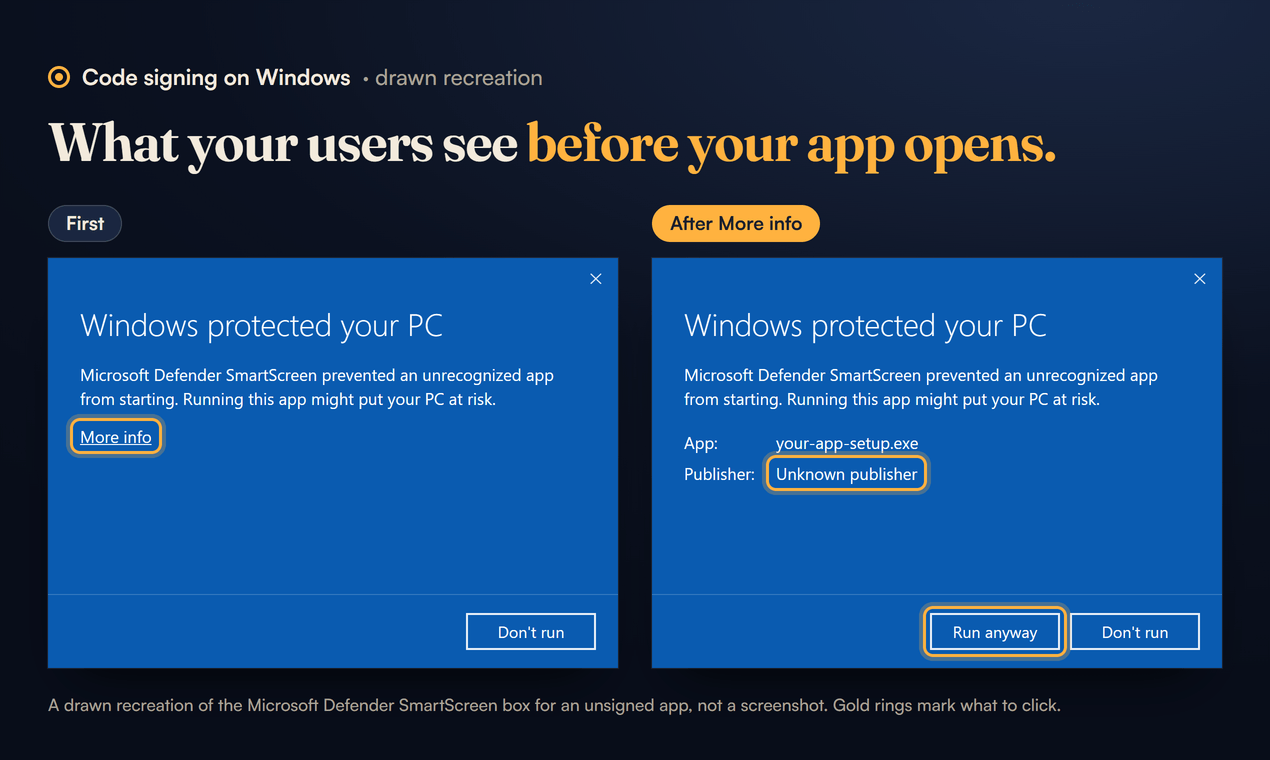
Self signing doesn't help: Microsoft lists a self signed file as the "Same behavior as no signature". And on Windows 11, Smart App Control can go further and "block execution of unsigned files unless the file has a positive reputation" (same page).
That's the moment you lose people. Plenty of them won't click More info, and the ones who do are clicking past Windows telling them not to.
Why signing doesn't make it go away
This is the bit most "just buy a certificate" advice gets wrong. SmartScreen works on reputation, and reputation comes from downloads, not money. Microsoft's own page on it says that even when signed, a new binary "could still show a SmartScreen warning until its hash or publisher certificate accumulates sufficient evidence of positive reputation", and that there's no exact threshold: "it can take several weeks and hundreds of clean installs from a wide audience" (Microsoft Learn).
What signing does buy you:
- Your name instead of "Unknown publisher" in the warning and in the install prompt.
- Reputation that carries over. Every release signed with the same identity builds on the last one. Unsigned, every new version starts from zero again.
What it doesn't buy is a clean first week.
EV certificates no longer skip the warning
For years the advice was to pay extra for an Extended Validation (EV) certificate, because EV used to get SmartScreen trust straight away. Microsoft now says plainly: "EV certificates no longer bypass SmartScreen", and "Paying a premium for EV solely to avoid SmartScreen warnings is no longer justified" (Microsoft Learn). Its code signing comparison dates the change to 2024 (Microsoft Learn).
Some certificate sellers and even some build tool docs still promise instant reputation for EV (SSL.com's FAQ and electron-builder's code signing page both did when I checked in September). Microsoft's page is the one that decides what SmartScreen does, so go by that.
What each option costs in 2026
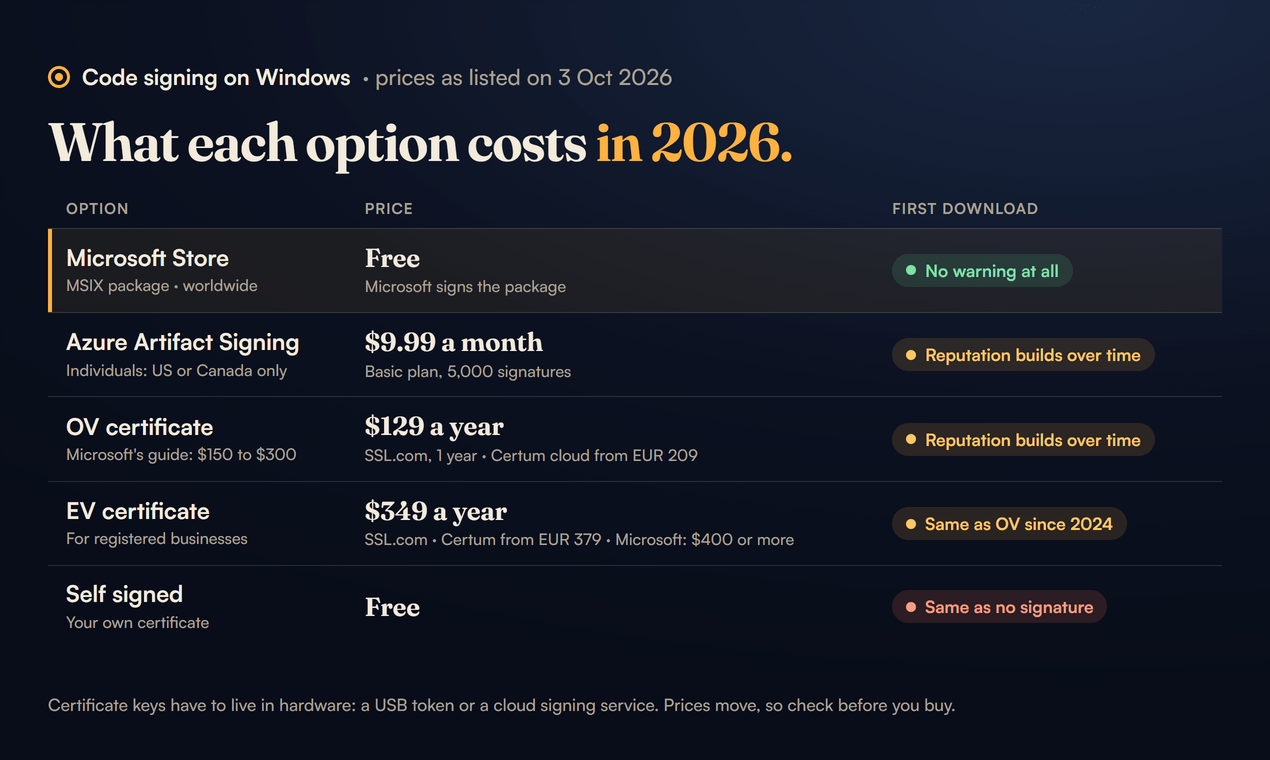
Prices as listed on 3 Oct 2026. Check them again before you buy, they move.
- Microsoft Store (MSIX package): free, worldwide, and no warning at all.
- Azure Artifact Signing: $9.99 a month on the Basic plan (5,000 signatures). Organisations in a list of countries, individuals in the US or Canada only. Reputation builds over time.
- OV certificate: $129 a year at SSL.com on a one year term, or from EUR 209 a year for Certum's cloud certificate. Microsoft's own guide says $150 to $300. Reputation builds over time.
- EV certificate: $349 a year at SSL.com, from EUR 379 at Certum, and Microsoft says $400 or more. For registered businesses. Same SmartScreen behaviour as OV since 2024.
- Self signed: free, and treated the same as no signature.
A few things the price tags hide:
- The key has to live in hardware. A USB token (SSL.com lists a YubiKey at $379) or a cloud signing service. SSL.com's cloud signing starts at $20 a month for 20 signings, on top of the certificate.
- Artifact Signing is the cheapest, if you qualify. Microsoft's quickstart says "Individual developers must be located in the United States or Canada"; organisations from a longer list of countries (the EU, the UK, Australia, New Zealand, Japan and others) can apply as a business. Identity checks take "from 1 to 20 business days" (Microsoft Learn). Microsoft treats it and an OV certificate the same for SmartScreen (Microsoft Learn).
- Open source projects can get free signing through SignPath Foundation, which Microsoft's comparison page names. A closed source paid app like mine doesn't qualify.
Two industry rules sit under every one of these. The private key has to live in a hardware module (a USB token or a cloud HSM), and code signing certificates issued from 1 March 2026 can't be valid for more than 460 days (CA/Browser Forum). So a certificate lasts about 15 months at most now, and the multi year deals are prepaid reissues.
Why I went with the Store instead
For my screen recorder the cheapest real option worked out at about $120 a year, and I'm making more than one Windows app. Pretty steep on a per app basis, for a warning that still shows up on day one.
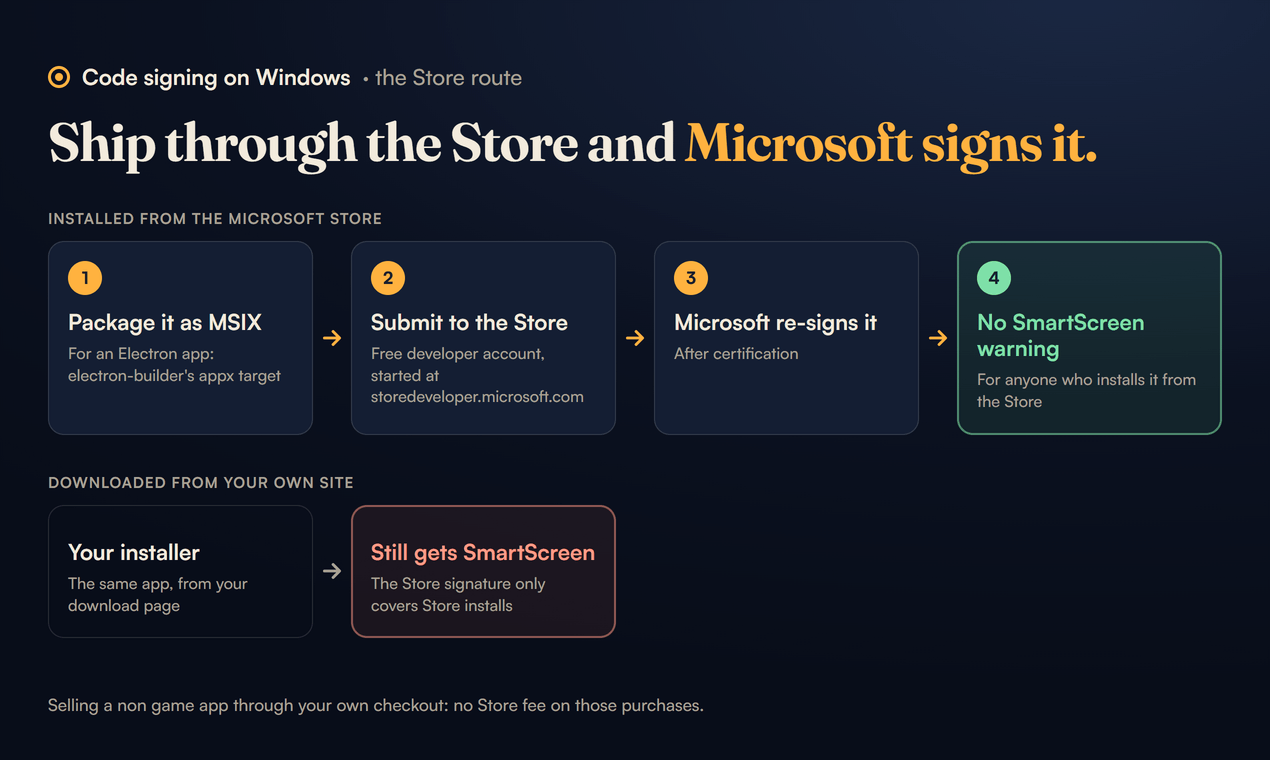
Then I figured out how easy the Microsoft Store makes this. If you ship an MSIX package through the Store, Microsoft signs it: "Microsoft re-signs the package after certification", and "Users will never see a SmartScreen warning for a Store-installed app" (Microsoft Learn, Microsoft Learn).
Two things make it cheaper than I expected:
- The developer account is free. Microsoft dropped the fee for individual developers in September 2025 and for companies in May 2026 (Windows Developer Blog, Windows Developer Blog). The catch is where you start: the free flow only runs from storedeveloper.microsoft.com. Microsoft says other paths, "direct via Partner Center, Xbox, or Visual Studio", show the old flow (Microsoft Learn). I posted in September that it cost $19 once. It doesn't, if you start in the right place.
- No cut if you sell through your own checkout. For a non game app on Windows, the App Developer Agreement says "Purchases made on a third-party commerce engine are not subject to the Store Fee". The 15 percent only applies when you use Microsoft's own commerce engine (App Developer Agreement 8.11). The Store policies allow it for "Non-game products made available on PC devices", as long as you name the payment provider, confirm the purchase with the user and note the third party API when you submit (Microsoft Store Policies, 10.8).
So the plan for Framok is a free Store listing with a 7 day trial, and the same licence key people buy on framok.com. Microsoft signs it, and the sale goes through my own checkout.
The catches with the Store route
- It only covers Store installs. Anyone who downloads the installer from your own site still gets SmartScreen. Framok's direct download isn't signed yet, so it still shows the warning and the site tells people to click More info, then Run anyway.
- You need an MSIX package. For an Electron app that means electron-builder's
appxtarget with the identity values from Partner Center (the package name, the publisher and the display name), plus Store tiles. - Pick the account type carefully if you sell. The Store policies say company accounts "must be used for organizations, businesses, and any person acting in relation to their trade or profession", and that "Products from individual accounts cannot require financial information for primary functionality" (Microsoft Store Policies, 10.8.3 and 10.14). Both account types are free now, so read those two lines before you choose.
- Updates come from the Store. If your app updates itself, switch that off in the Store build.
- Licensing has to know where it's running. Framok's trial lives in the Store version only, so the app has to tell a Store install from a direct one. On Windows that's one call,
GetCurrentPackageFullName, which only returns a name when the process has a package identity.
As I write this, Framok's Store version is still on its way. When it's live I'll add what the submission was like.
So what should an indie developer do?
- One app, small audience, no budget: ship unsigned, tell people about More info and Run anyway on your download page, and put the Store on your list.
- You sell on your own site and want your name on the warning: the cheapest validated identity you can get, renewed every year, and accept that the warning fades with installs rather than disappearing.
- You want no warning at all: the Microsoft Store. It's the only route that does that.
Framok is $39 once for the life of the product, or $5 a month, both for 2 of your own PCs. Windows 10 and 11, 64 bit.
Anyone else gone the Store route with an Electron app? Keen to hear how the review went.
Sources
- Microsoft Learn, Microsoft Defender SmartScreen and app reputation, updated 17 Aug 2026
- Microsoft Learn, Code signing options for Windows app developers, updated 29 Aug 2026
- Microsoft Learn, Artifact Signing quickstart, updated 29 Sep 2026
- Azure, Artifact Signing pricing and the Azure Retail Prices API (Basic $9.99, Premium $99.99 a month)
- Microsoft Learn, Open a developer account, updated 17 Jul 2026
- Windows Developer Blog, free registration for individual developers, 10 Sep 2025, and for companies, 7 May 2026
- Microsoft Store App Developer Agreement, version 8.11, sections 5 and 6
- Microsoft Learn, Microsoft Store Policies, version 7.20, sections 10.8 and 10.14
- CA/Browser Forum, Code Signing Baseline Requirements, version 3.11.0
- SSL.com, OV and EV code signing prices, and eSigner pricing
- Certum, code signing shop
- Framok's own Store plan and build notes (docs/STORE.md in the Framok repo, 21 and 22 Sep 2026)