How to check a colour palette for readable text: contrast ratios, worked through real palettes
Short answer: for every colour you put text on, measure the contrast ratio between the text colour and the background. Body text needs at least 4.5:1, large text (24 px, or about 18.5 px bold) needs 3:1, and the edges of buttons, fields and the parts of a chart you need to see also need 3:1. Do not round: 4.49:1 fails. A palette is not "accessible" or "not accessible" on its own. Pairs are. So list the pairs you actually use and check each one.
Below is what the number means, how to work it out yourself in a few lines of code, and five checks on palettes from the Sundry Mill library, including one where our own page gave the wrong advice until this week.
What a contrast ratio is
WCAG 2 defines contrast as (L1 + 0.05) / (L2 + 0.05), where L1 is the relative luminance of the lighter colour and L2 of the darker one. Relative luminance is how bright a colour looks to the eye on a scale from 0 (black) to 1 (white). Green counts for most of it, red for some, and blue for very little, which is why a bright blue can be surprisingly dark as a background and a yellow surprisingly hard to read on white.
The ratio runs from 1:1 (the same colour twice) to 21:1 (black on white). It does not care which colour is the text and which is the background, so dark text on a light card and light text on a dark card measure the same.
One detail if you write your own: the luminance formula has a threshold constant that was 0.03928 before May 2021 and is now 0.04045. WCAG's own note says the change "has no practical effect on the calculations". Our library still uses the older constant, and every figure in this post comes from it.
The numbers to remember
From the WCAG 2.2 success criteria:
- 4.5:1 for normal text (1.4.3, level AA). This is the one that matters most.
- 3:1 for large text. Large means at least 18 point, or 14 point bold. In CSS pixels that is about 24 px, or about 18.5 px bold.
- 3:1 for the parts of controls and graphics you need to see (1.4.11, Non-text Contrast). The outline of a text field, the track of an off switch, a focus ring, the bars of a chart that carries information.
- 7:1 for normal text and 4.5:1 for large text if you want the stricter AAA level (1.4.6).
The understanding document for 1.4.3 is blunt about rounding: computed values "should not be rounded (e.g., 4.499:1 would not meet the 4.5:1 threshold)". Logos and text in inactive controls have no contrast requirement, and neither does incidental text, like a street sign in a photo.
Check it yourself in ten lines
You do not need a tool for this. Here is the function the library uses to fill in the "Text that reads" list on every palette page. It takes two hex codes and returns the ratio.
function rgb(hex) {
  const n = parseInt(hex.slice(1), 16);
  return [(n >> 16) & 255, (n >> 8) & 255, n & 255];
}
function lum(hex) {
  const [r, g, b] = rgb(hex).map((v) => {
    const c = v / 255;
    return c <= 0.03928 ? c / 12.92 : ((c + 0.055) / 1.055) ** 2.4;
  });
  return 0.2126 * r + 0.7152 * g + 0.0722 * b;
}
function contrast(a, b) {
  const [x, y] = [lum(a), lum(b)].sort((p, q) => q - p);
  return (x + 0.05) / (y + 0.05);
}

contrast('#351E28', '#D7EFFF'); // 12.93
Paste it into your browser's console, call it with your pairs, and keep the third decimal when a result is close to a threshold.
Check 1: a trend palette with one dark colour
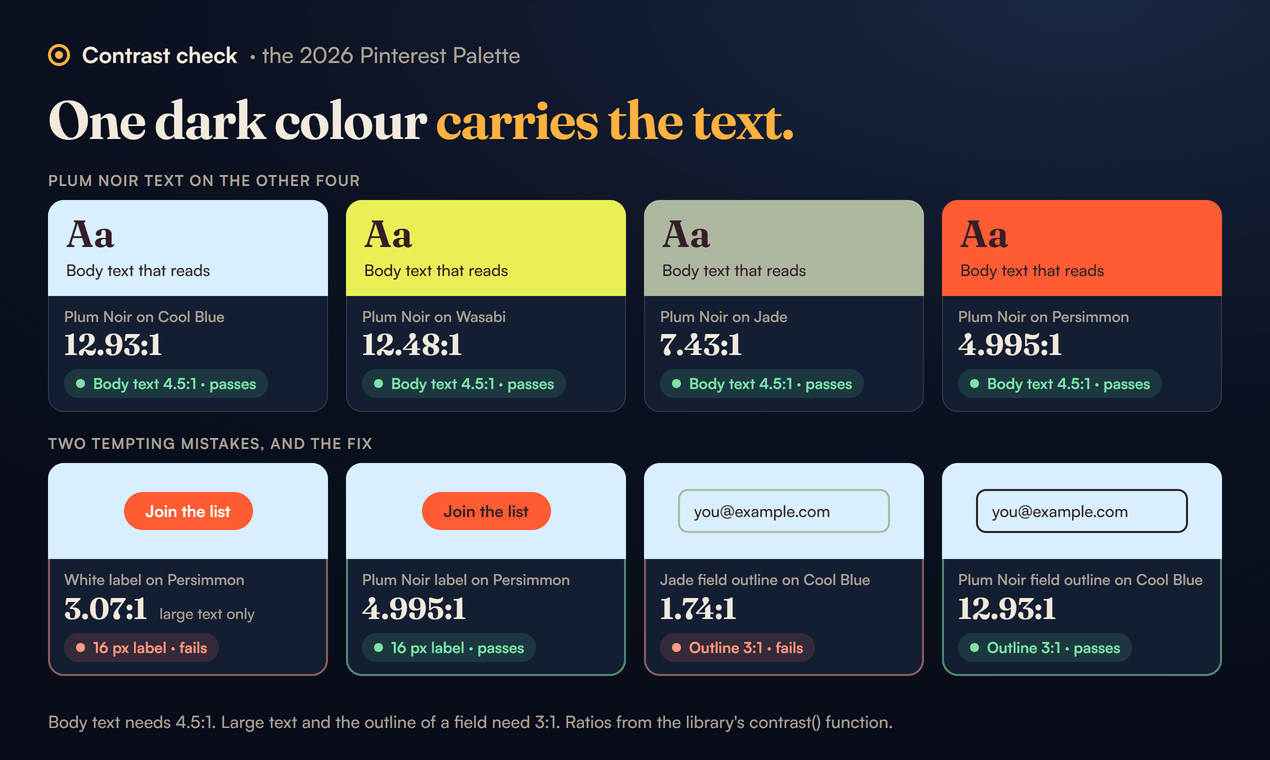
The 2026 Pinterest Palette has five colours: Cool Blue #D7EFFF, Jade #AEB8A0, Plum Noir #351E28, Wasabi #E9F056 and Persimmon #FF5C34. Only Plum Noir is dark, so it has to carry the text. Measured against the other four:
- Plum Noir on Cool Blue: 12.93:1
- Plum Noir on Wasabi: 12.48:1
- Plum Noir on Jade: 7.43:1
- Plum Noir on Persimmon: 4.995:1
All four pass for body text, the last one by a small margin. The tempting mistake is white text on Persimmon, because a bright orange button with a white label looks right. It measures 3.07:1, which is fine for a large headline and not for a 16 px button label. So the button on the library page uses a Plum Noir label.
The second mistake is easy to miss because it is not text: the outline of an email field. If you draw it in Jade on a Cool Blue page, it measures 1.74:1, well under the 3:1 that 1.4.11 asks for, and people with low vision will not see where the field is. Draw the outline in Plum Noir and keep Jade for a divider line, which is decoration and has no requirement.
Check 2: the autumn palette, and a pair we got wrong
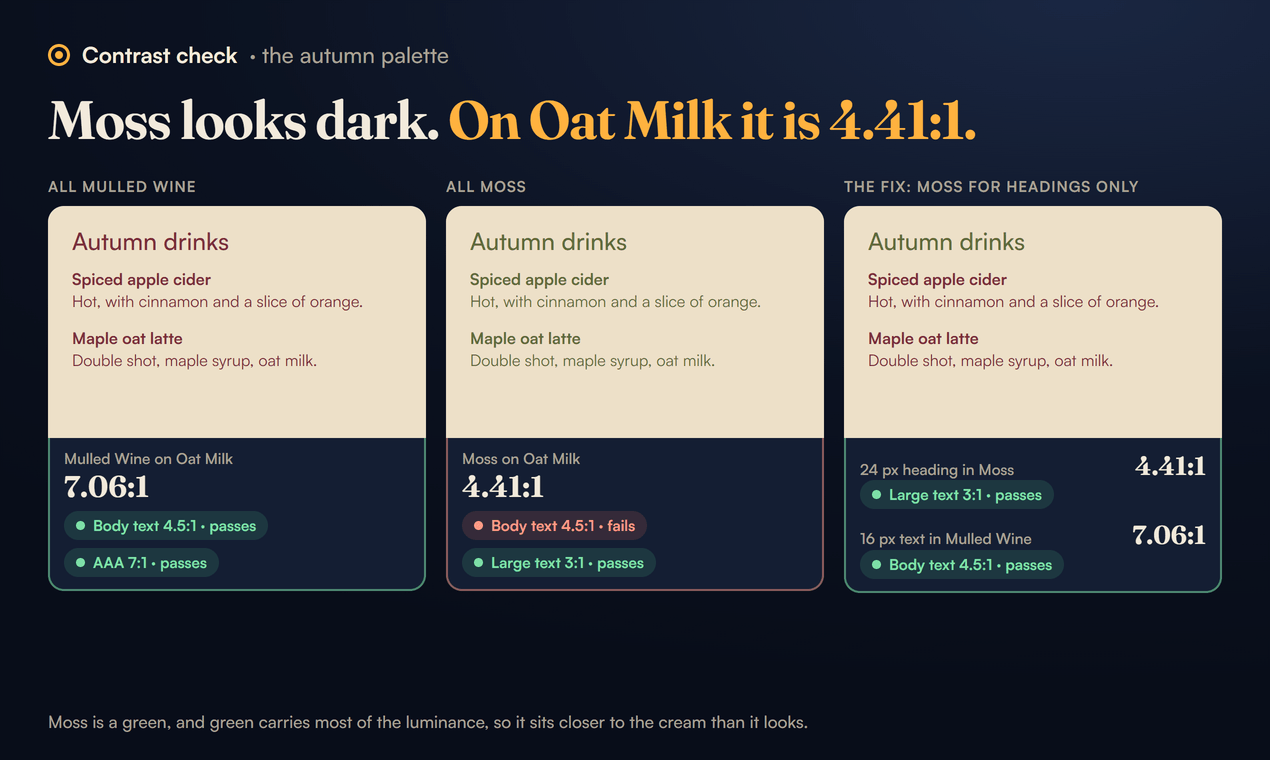
The autumn palette is Mulled Wine #7A2E3A, Rust #B4532A, Harvest Gold #D8A13A, Moss #5F6B3A and Oat Milk #EDE0C8. Until 27 October its page said that for body text you could "stay on Oat Milk, where both dark colours pass easily", meaning Mulled Wine and Moss.
Measured, only one of them does:
- Mulled Wine on Oat Milk: 7.06:1. Passes, even at AAA.
- Moss on Oat Milk: 4.41:1. Fails for body text.
Moss looks dark. It is a deep olive and it reads as "dark enough" at a glance. But it is a green, and green carries most of the luminance, so it sits closer to the cream than it looks. At 4.41:1 it passes for large text only, so it is fine for a 24 px heading and wrong for the paragraph under it. We corrected the page and added a worked example (a cafe menu card) that uses Moss only for headings.
The lesson is general: judging contrast by eye fails most often with greens and with saturated mid tones. Measure the pairs that "obviously" pass, too.
Check 3: a dashboard that fails by a hair, and a chart that fails by a lot
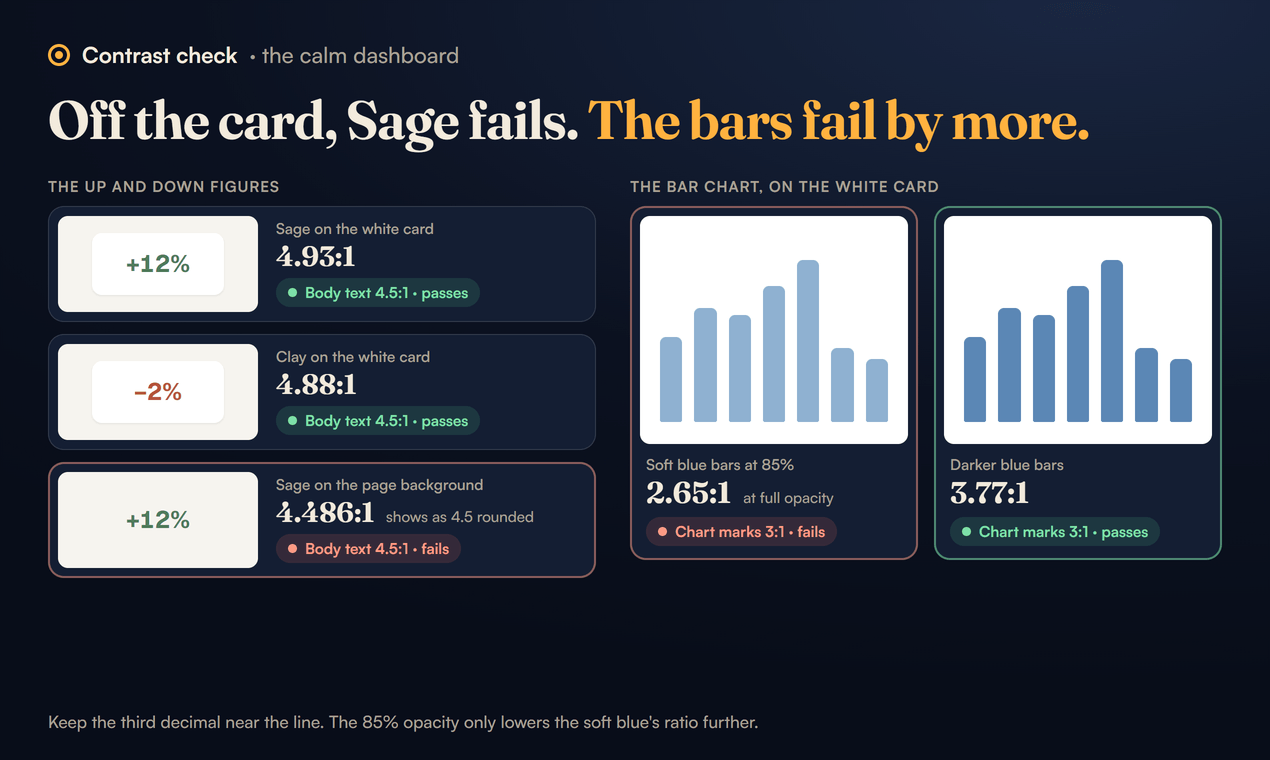
The calm dashboard uses eight tokens, including Sage #4E7A5B for good news and Clay #B4553A for bad news, shown as small "+12%" and "−2%" figures on white cards.
- Sage on the white card: 4.93:1. Passes.
- Clay on the white card: 4.88:1. Passes.
- Sage on the page background
#F6F4EF: 4.486:1. Fails.
That last one is the 4.499 case from the WCAG note in real life. Move the figure off the card onto the page, and a colour that passed now fails, because the off white background is a touch darker than white. Rounded to one decimal it shows as 4.5, which is exactly why you keep the third decimal.
The bar chart on the same page is a clearer failure. The bars are Soft blue #7BA3C9 at 85% opacity on white. At full opacity that blue is 2.65:1 against white, and the transparency only lowers it. If the bars are the only way to read the numbers, 1.4.11 asks for 3:1. There are two fixes: print each value above its bar, so the bars become decoration, or darken them. #5B87B5 measures 3.77:1 on white and still looks like the same soft blue family.
Check 4: a success state that misses
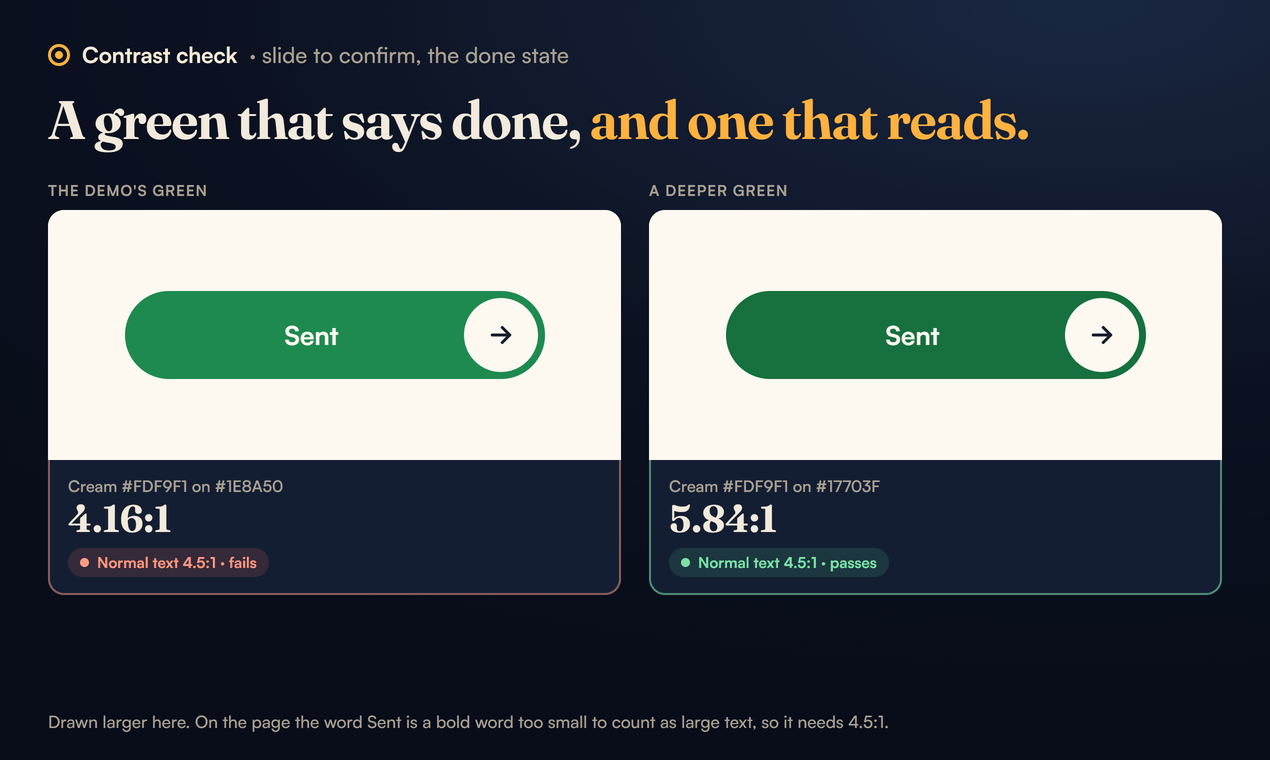
Our slide to confirm control turns green when it is done and shows the word "Sent" in cream #FDF9F1 on green #1E8A50. That pair measures 4.16:1. For a bold word that is not large enough to count as large text, it falls short.
Greens are the usual culprit again. A deeper green, #17703F, measures 5.84:1 with the same cream and still reads as "done". We kept the demo's colour on the page so it matches the pin, and put the fix in the page's worked example.
Check 5: why no text colour survives a moving sky
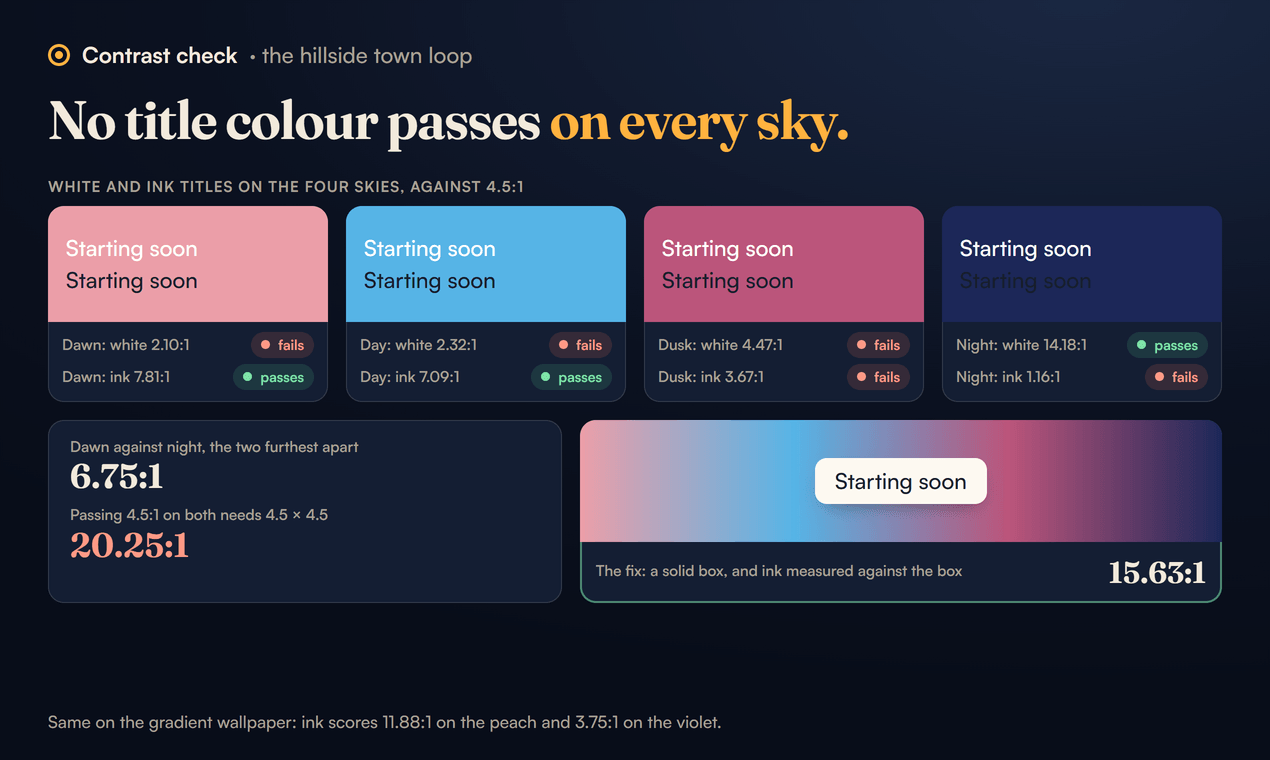
The hillside town loop runs through four skies: dawn #EB9EA8, day #56B4E6, dusk #BB557B and night #1C2758. Suppose you want to put a "Starting soon" title straight on it. Which colour should the title be?
There isn't one, and the reason is neat. Contrast ratios multiply. If a text colour has 4.5:1 against a light background and 4.5:1 against a dark one, then the two backgrounds must be 4.5 × 4.5 = 20.25:1 apart. The lightest sky (dawn) against the darkest (night) is only 6.75:1. So any colour that passes on dawn fails on night, and the other way round.
The same arithmetic applies to every background that changes: photos, videos, gradients. Our moving gradient wallpaper goes from a peach #FFD2BD, where ink text #17202C scores 11.88:1, to a violet #7A5CFF, where the same ink scores 3.75:1. The fix is always the same: give the text its own solid box, and measure the text against the box.
A routine that catches all of this
- Write down the pairs you use, not the palette. Body text on page, body text on card, button label on button, link on page, placeholder on field, field outline on page, focus ring on page, chart marks on card.
- Measure each one with the function above or any checker that uses the WCAG formula.
- Mark each pair with its job. Body text needs 4.5:1, large headings 3:1, outlines and chart marks 3:1. A pair can be fine for one job and wrong for another, like Moss on Oat Milk.
- Keep three decimals near the line. 4.486 is not 4.5.
- Check every state. Hover, focus, selected, done and error colours are new pairs. The success green in check 4 only appears after the action.
- Give text a box on anything that moves. If the background changes, measure against the box.
What contrast does not cover
A pair that passes can still fail people in other ways:
- Colour alone. WCAG 1.4.1 says colour should not be the only way information is shown. Red and green "down" and "up" figures need the minus and plus signs too, which the dashboard has. Our tick and cross toggle switch shows a cross or a tick on the knob for the same reason.
- Thin type. The ratio assumes ordinary strokes. A hairline serif like Instrument Serif at 18 px reads worse than the number suggests, which is why the library keeps it at 40 px and up.
- Long reading. For comfortable reading, WCAG's AAA guidance asks for lines no wider than 80 characters and line spacing of at least one and a half times the text size (1.4.8). Contrast gets the letters seen. Spacing gets them read.
Every palette page in the library lists the pairs that pass, with their ratios, strongest first. If one of them is wrong, tell us at support@sundrymill.com and we will fix the page, as we did with the autumn one.
Sources
- WCAG 2.2: success criteria 1.4.1, 1.4.3, 1.4.6, 1.4.8 and 1.4.11, and the definitions of contrast ratio and relative luminance, including the note on the 0.03928 and 0.04045 constants.
- Understanding Success Criterion 1.4.3: Contrast (Minimum): large text sizes in CSS pixels, the rounding note, logos and incidental text.
- Understanding Success Criterion 1.4.11: Non-text Contrast: controls, states, focus indicators and graphics.
- Pinterest Palette: the five 2026 colours.
- All ratios computed on 27 October 2026 with the
contrast()function in the Sundry Mill library build, shown above.