OBS "zoom to mouse" not working? The OBS 32 fix, and when to skip the script
Short answer: OBS 32 removed two functions the zoom to mouse script calls. Open obs-zoom-to-mouse.lua in a text editor, replace obs_sceneitem_get_info with obs_sceneitem_get_info2 (3 places) and obs_sceneitem_set_info with obs_sceneitem_set_info2 (1 place), save, and reload the script in Tools, Scripts. The original repo hasn't been updated since February 2024, so the fix isn't coming from there.
If your error is something else (no sources in the list, the zoom landing in the wrong spot, two monitors), the setup section below covers what the script's own readme says, and what people in the issues have found.
Is this your error?
The script still loads in OBS 32, then fails the first time it touches your Display Capture source. In the script log you'll see something like:
attempt to call field 'obs_sceneitem_get_info' (a nil value)usually just after "Failed to call frontend_event_callback" or "Failed to call script_update". The hotkey does nothing, or the zoom fires once and gets stuck.
Why it broke
The script is obs-zoom-to-mouse by BlankSourceCode. Its readme says it was built with OBS 29.1.3, the last release (v1.0.1) is from 30 Nov 2023, and the last commit is from 13 Feb 2024.
A week after that last commit, OBS marked the old scene item transform functions as deprecated, "in favor of" obs_sceneitem_get_info2 and obs_sceneitem_set_info2, which shipped in OBS 30.1 (OBS commit 4b138f6). Deprecated means they still worked, so nothing changed for users. Then in August 2025 OBS removed them (commit b7c399f), and OBS 32.0, released 22 Sep 2025, was the first version without them. The OBS docs now only list the 2 versions (OBS docs).
Every OBS since then, up to 32.2.2 (14 Aug 2026) and the 33 betas, has the same problem with the original script.
The fix, step by step
- Find the script. It's wherever you saved
obs-zoom-to-mouse.lua. If you're not sure, open Tools, Scripts in OBS, click the script and look at its path. - Open it in a plain text editor like Notepad. Make a copy of the file first if you want a way back.
- Replace the getter. Find
obs_sceneitem_get_infoand change each one toobs_sceneitem_get_info2. There are 3. In the v1.0.1 release file they're on lines 435, 556 and 562; in the newer file on the main branch, lines 451, 577 and 583. - Replace the setter. Change the one
obs_sceneitem_set_infotoobs_sceneitem_set_info2(line 611 in v1.0.1, line 634 on main). - Save, go back to Tools, Scripts, select the script and press the reload button.
Be careful with find and replace all: if you replace get_info with get_info2 twice, you end up with get_info22. Search for each one and check it before you change it.
This is the fix posted in the repo's issues (#84, #74) and on the OBS forum reviews ("change: obs_sceneitem_get_info → obs_sceneitem_get_info2 (3 occurrences)"), with users confirming it works into May 2026. A pull request with the same change was opened in November 2025 and closed by its author in May 2026 without being merged, so the main repo is still broken.
There are forks with the fix already in, like samridhx0/OBS-Cursor-Zoom linked in issue #74. A Lua script runs inside OBS, so read a fork before you install it. Editing four lines of the original yourself is the safer bet.
The setup that keeps it working
If the error is gone and it still misbehaves, check the setup the readme asks for:
- Display Capture only, out of the box. The readme says it "Only works on
Display Capturesources (automatically)". For a window or game capture, tick Show all sources and fill in Set manual source position. - The transform. Right click the Display Capture source, Transform, Edit Transform: Positional Alignment Top Left, Bounding Box type Scale to inner bounds, Alignment in Bounding Box Top Left, and no crop. If you need a crop, use a Crop/Pad filter instead. The script tries to change these for you if they're wrong.
- The hotkey. In File, Settings, Hotkeys, set Toggle zoom to mouse, and optionally Toggle follow mouse during zoom.
- After any display change, re-add the source. If you move a monitor, change the primary display or rotate one in Windows, the readme says you need to re-add the Display Capture source and reload the script.
Other problems people report, with no official fix:
- No sources in the list (just [None]) on Windows 11 and OBS 32.0.4, in issue #91.
- Two monitors. A forum user couldn't get it working across two; the workaround suggested was a copy of the script per monitor with its own hotkey (OBS forum).
- Blurry after zooming out until the scripts are reloaded, and right clicks breaking it, both on the same forum thread.
- Mac Retina screens may need the Monitor Height set by hand (issue #24).
Newer scripts that do more
Two newer free, open source projects showed up on Reddit this year with smoother, auto zoom:
- OBS-Smooth-Zoom, "a simple OBS script which zooms in to cursor real time without needing post editing", with an animated cursor (109 upvotes on r/VideoEditing, Feb 2026).
- OBS-Screen-Studio-script, "smooth auto zoom effects to OBS (like Screen Studio)" (49 upvotes on r/obs, Apr 2026).
I haven't tested either, and the same rule applies: read the script first.
When to skip the script
Every one of these zooms live, so the zoom is part of the recording. Zoom on the wrong spot, or a beat too late, and it's in the video with no undo. And OBS itself has no zoom: its built in filters crop, pad and scale a source, but nothing follows the mouse (OBS).
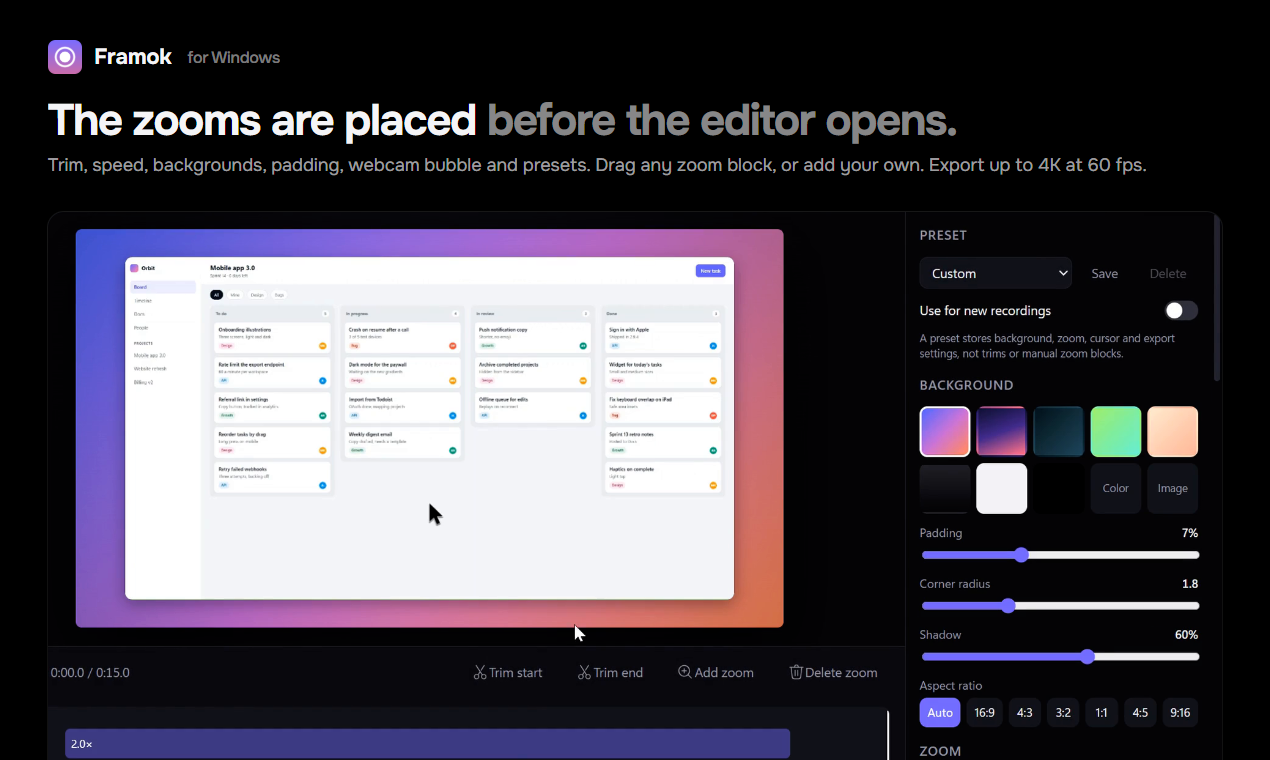
If you'd rather set the zoom after recording, that's what I built Framok for. It's a screen recorder for Windows that logs every click and key while you record and places the zooms in the editor, where you can drag, delete or add them before you export. The catch: it only works on recordings made in Framok, not on OBS footage, and it doesn't stream. It's $29 once or $5 a month, Windows 10 and 11.
If you stream, or you're happy in OBS, the four line fix above is all you need.
Did the fix work on your OBS version? Let me know if it didn't and I'll add what you found.
Sources
- GitHub, obs-zoom-to-mouse by BlankSourceCode: readme, release v1.0.1, commit history, and issues #24, #72, #74, #84 and #91, and pull request #82
- OBS Studio on GitHub, commits 4b138f6 (deprecating the old transform functions, Feb 2024) and b7c399f (removing them, Aug 2025),
libobs/obs.hat tags 31.1.2 and 32.0.0, and the releases page - OBS docs, Scene item functions
- OBS forum, Zoom to Mouse resource and reviews and the discussion thread
- OBS knowledge base, Filters guide
- Reddit, via the Arctic Shift archive: r/VideoEditing 1qxf69u and r/obs 1sjdu94