How to make a lyric video for free, on a phone or a PC
Short answer: on a phone, CapCut's Auto Lyrics listens to your song and puts the words on screen for you, and it's mobile only. On a PC, Canva has lyric video templates where you type each line and drag its clip to match the vocal, and Clipchamp lets you add text by hand. Or drop the song into a free browser tool that lines up the lyrics you paste. Whatever you use: one or two short lines at a time, big text, 16:9 at 1920 x 1080 for YouTube and 9:16 for TikTok, Reels and Shorts. And if your song is out through a distributor, sort out Content ID before you upload, or your own Short can get blocked.
This is for musicians with a finished song and no video budget. Here are the free routes, then the bits that make a lyric video easy to read.
Before you start
- The audio. The final master, as a WAV or MP3.
- The lyrics, one screen line per line. Break them where the singer breathes, not where the sentence ends. This is the step that decides how the video reads, and most tools want the lyrics in this shape anyway.
- The shape. YouTube's normal player is 16:9, and its help lists 1080p as 1920 x 1080. YouTube also asks you not to add padding or black bars to the video itself (YouTube Help). For TikTok, Reels and Shorts, make a 9:16 version too. Shorts can now be up to three minutes long, as long as the video is square or vertical (YouTube Help).
On a phone: CapCut Auto Lyrics
CapCut's help page is clear that Auto Lyrics is a phone feature: it's "fully supported and actively maintained only on the mobile app", the desktop version doesn't include it, and as of January 2026 neither does CapCut Web (CapCut Help). Some of CapCut's older pages still describe desktop steps, so go by the help page.
It needs a clear vocal. The same page says the option won't appear if the audio is "silent, instrumental, or too noisy". So use the full mix with vocals, not the instrumental.
The thing to watch with CapCut is the watermark. It asks you to go Pro when a project contains any premium element, and a free account can't remove the watermark from a video that has Pro materials in it, "regardless of resolution" (CapCut Help). Stick to fonts, effects and stickers without the Pro badge and check the export screen before you post.
Instagram's own lyrics. If your song is already in Instagram's music library (because it went out through a distributor), you don't need a lyric video for Reels at all. Add the song to the Reel and Instagram can animate the lyrics, with a choice of font style and position (Instagram). Stories have a lyrics only style for music stickers too (Instagram). Lyrics reach those apps through lyric services like LyricFind and Musixmatch, which your distributor can send them to (Soundrop).
On a PC: Canva or Clipchamp
Canva has a set of lyric video templates (63 when I looked). The workflow on its own page: upload your song, type in your lyrics, and "adjust the clip lengths to match each line". Its AI Beat Sync, which cuts to the beat for you, is a Pro feature; the free way is to sync by hand using beat markers (Canva, Canva Help). Beat Sync handles songs up to 10 minutes. Canva doesn't time words to the singing for you, so every line is placed by hand.
Clipchamp is already on Windows 11. Its free plan exports at up to 1080p ("1080p is the largest free resolution we offer") and it doesn't add a watermark (Microsoft Support, Microsoft Support). Its automatic captions are made for voice ("only compatible with video and audio assets that include voice") and Microsoft doesn't say anything about singing (Microsoft Support), so plan on adding each line as a text box and dragging it to its spot on the timeline.
Doing it by hand in either one: put the audio on the timeline, play it, and drop a marker at the start of every line. Then put each text box between two markers.
How to time the lines to the vocal
- Show the line just before it's sung. A beat early, so people are reading as they hear it, never catching up.
- Hold it until the next line, unless there's a long instrumental gap. Then clear the screen.
- Keep the reading pace sane. The BBC's subtitle guidelines aim for 160 to 180 words a minute (BBC). A fast verse sung quicker than that is a sign to split the line differently, not to make the text smaller.
- Type what's sung. Netflix's style guide says lyrics should be transcribed verbatim (Netflix). If the singer repeats a line four times, the video does too.
Text that reads on a phone
Most people will watch on a phone, so size for that.
- Short lines. Netflix caps a subtitle line at 42 characters (Netflix). The BBC says the 37 characters that fit across a 16:9 frame become about 25 in a 9:16 frame (BBC).
- Two lines at most in 16:9, three in 9:16, per the same BBC guidelines.
- Bigger than you think. The BBC's online subtitles are 7 to 8 percent of the video height in 16:9. A lyric video is all text and no picture, so go well beyond that.
- Thick, plain fonts. Thin script fonts look great on a desktop preview and fall apart on a phone in daylight.
- Keep clear of the app buttons in 9:16. TikTok, Reels and Shorts put the caption and account name along the bottom and the like and share buttons down the right. TikTok publishes safe zone templates with its ad specs (TikTok). Keep the lyrics in the middle of the frame and you're fine on all three.
Your own song and copyright
If you wrote it and own the recording, you can make a lyric video of it. The trap is Content ID. When your song goes out through a distributor, it's usually registered with YouTube's Content ID, which can then claim your own upload.
- A claim isn't a strike. You can leave it, cut the song, share the revenue or dispute it (YouTube Help).
- Shorts over a minute are different. YouTube's Shorts page says a Short "over one minute in duration with an active Content ID claim of any type, including manual claims, will be blocked globally" (YouTube Help). There's no penalty to your channel, but nobody sees the video.
- Ask your distributor to allowlist you. How it works depends on who you use. DistroKid allowlists single videos once a claim has landed, not whole channels, through its YouTube Allowlist tool (DistroKid). TuneCore lets artists allowlist their own channel (TuneCore). Symphonic has an allowlist request form under Rights, and reviews each one (Symphonic).
And it only works for your song. Lyrics to someone else's song belong to the songwriter, even if you typed them out yourself.
The quick way: Wayvl
I built Wayvl as a free waveform video maker that runs in the browser, and it ended up being a decent lyric video maker too. It's free, there's no signup and no watermark, and it works on a phone as well as a PC.
- Drop in your song (MP3, WAV, M4A, FLAC and more, or a video file).
- Trim it to the part you want, up to five minutes.
- Pick 16:9 for YouTube or 9:16 for TikTok, Reels and Shorts. You can export several sizes in one go.
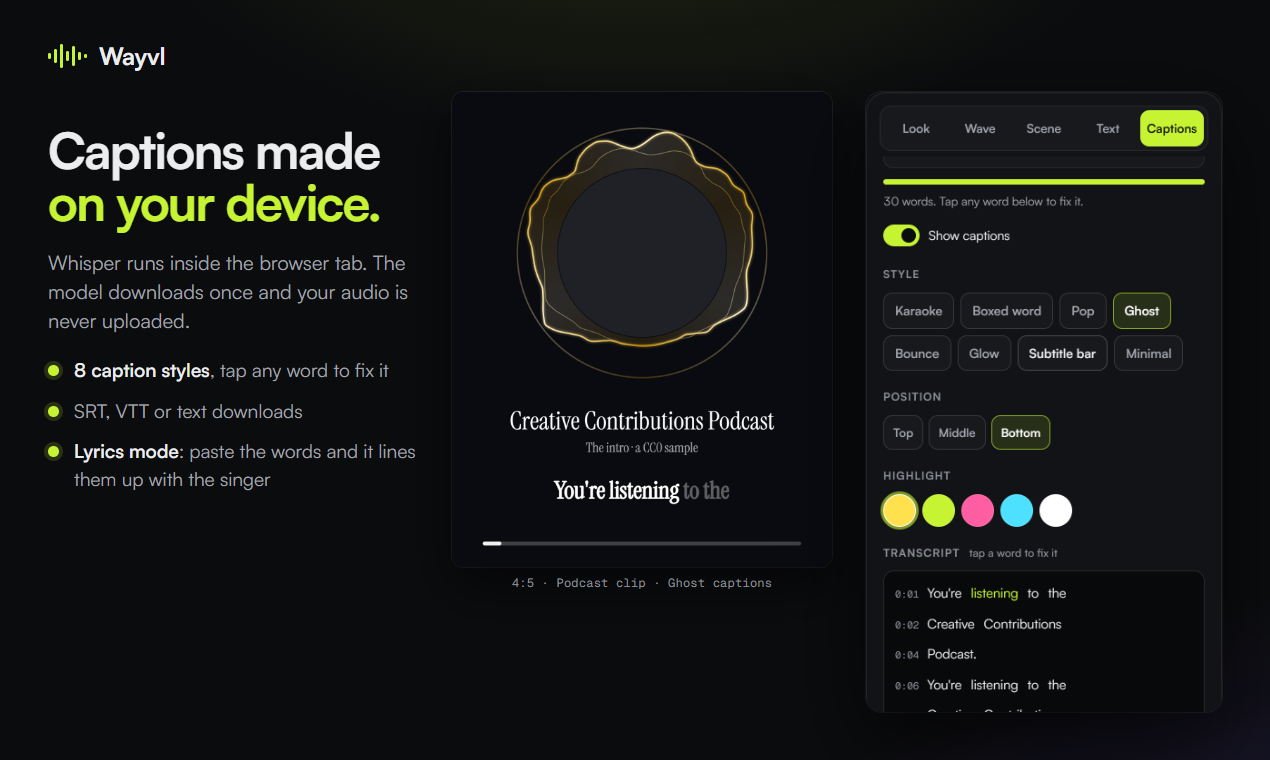
- Open Captions, pick A song with vocals, and paste your lyrics into Lyrics mode, one caption line per line. Wayvl listens for the words and puts yours on the beat, so the captions say exactly what you wrote.
- Pick a caption style and position, add a title and cover art, and Export MP4.
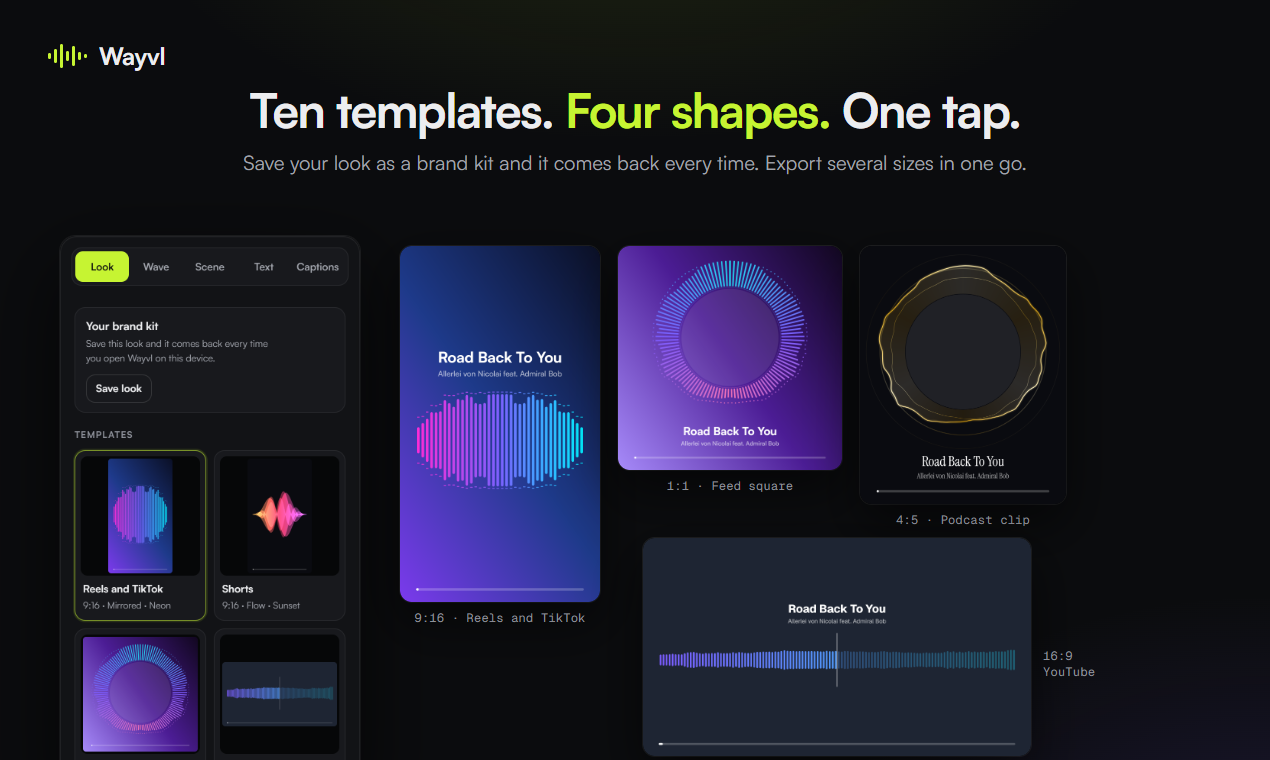
What's worth knowing:
- Your song isn't uploaded. The transcription, drawing and encoding all happen in the browser tab, so an unreleased track stays on your device.
- Songs need the bigger model. The speech model is a 40 to 80 MB download; for singing Wayvl uses Whisper small, about 250 MB, downloaded once, and a few times slower. Early on, captions on songs came back empty because the speech model answered music with a [Music] tag, which is why the song option exists.
- Fix any word by tapping it, and download the timed lyrics as SRT or VTT if you'd rather upload them to YouTube as captions too. YouTube Studio takes a caption file with timing, or a plain transcript it syncs itself (YouTube Help).
- Eight animated caption styles, eleven wave styles, your own font file (.ttf, .otf or .woff2), and a brand kit that remembers your look on that device.
Where Wayvl doesn't fit
- Five minutes at most. Longer clips take too much memory to encode in a browser tab. For a long track, make the video in Canva or Clipchamp.
- It's a waveform video with lyrics, not a kinetic typography edit. If you want words flying in from different directions, that's a job for a full editor.
- Big files. Roughly 1 to 1.5 MB per second of video, so a three minute song is a few hundred MB.
- Export needs a recent browser: Chrome or Edge on a computer, Chrome on Android, or Safari from iOS 16.4 and macOS 13.3. Firefox can preview but not export.
Wayvl is free at wayvl.com.
What are you releasing next? Always keen to hear what musicians need from the video side.
Sources
- CapCut Help, Auto Lyrics, January 2026, and CapCut Pro and exporting, 2 Apr 2026
- Canva, lyric video templates and Canva Help, syncing audio with video
- Microsoft Support, Clipchamp: export resolution, watermarks and autocaptions
- Instagram, Reels tips and tricks, 20 Jun 2024, and how to use Stories
- YouTube Help, video resolution and aspect ratios, Shorts up to three minutes, Content ID claims and adding subtitles and captions
- BBC, Subtitle Guidelines, version 1.2.5, March 2026
- Netflix, English (USA) Timed Text Style Guide, updated 28 Apr 2026
- TikTok Ads Help, In-Feed Ads specs and safe zone templates, June 2026
- Soundrop, providing lyrics through LyricFind or Musixmatch, updated 2 Oct 2026
- DistroKid, YouTube allowlist, updated 2 Sep 2026; TuneCore, YouTube monetisation and allowlisting; Symphonic, YouTube allowlist, updated 4 Aug 2026
- Wayvl's site (6 Oct 2026) and build notes (25 and 26 Sep 2026), for the formats, lyrics mode, song captions, the five minute limit, file sizes and browsers