Snipping Tool screen recording: the time limit, missing audio and why it stops
Short answer: Microsoft doesn't document any time limit on Snipping Tool screen recordings. The only 30 in its own posts is a 30 second cap on GIF export. A forum answer says recordings stop at 30 minutes and other sites say there's no limit, so for anything long, record in takes under 30 minutes. No audio is usually a setting (system audio and the mic are both optional, with defaults in the app's settings) or a headset plugged in mid recording, since it records the default output device. A missing Record button or a recording that vanishes is usually fixed by updating or repairing the app.
The search results for this disagree with each other, so here is what Microsoft actually says, what people report, and what to do about it.
How to record your screen with Snipping Tool
Press Windows + Shift + R, or open Snipping Tool, select the Record button and then New. Drag out the area, select Start, and Stop when you're done. You can save the recording as it is or select Edit in Clipchamp (Microsoft Support).
What it has picked up since recording arrived, going by the Windows Insider Blog:
- December 2022: screen recording first rolls out to Insiders, with pause added in January 2023 (Windows Insider Blog).
- August 2023: optional PC audio and microphone recording, with settings for the defaults (Windows Insider Blog).
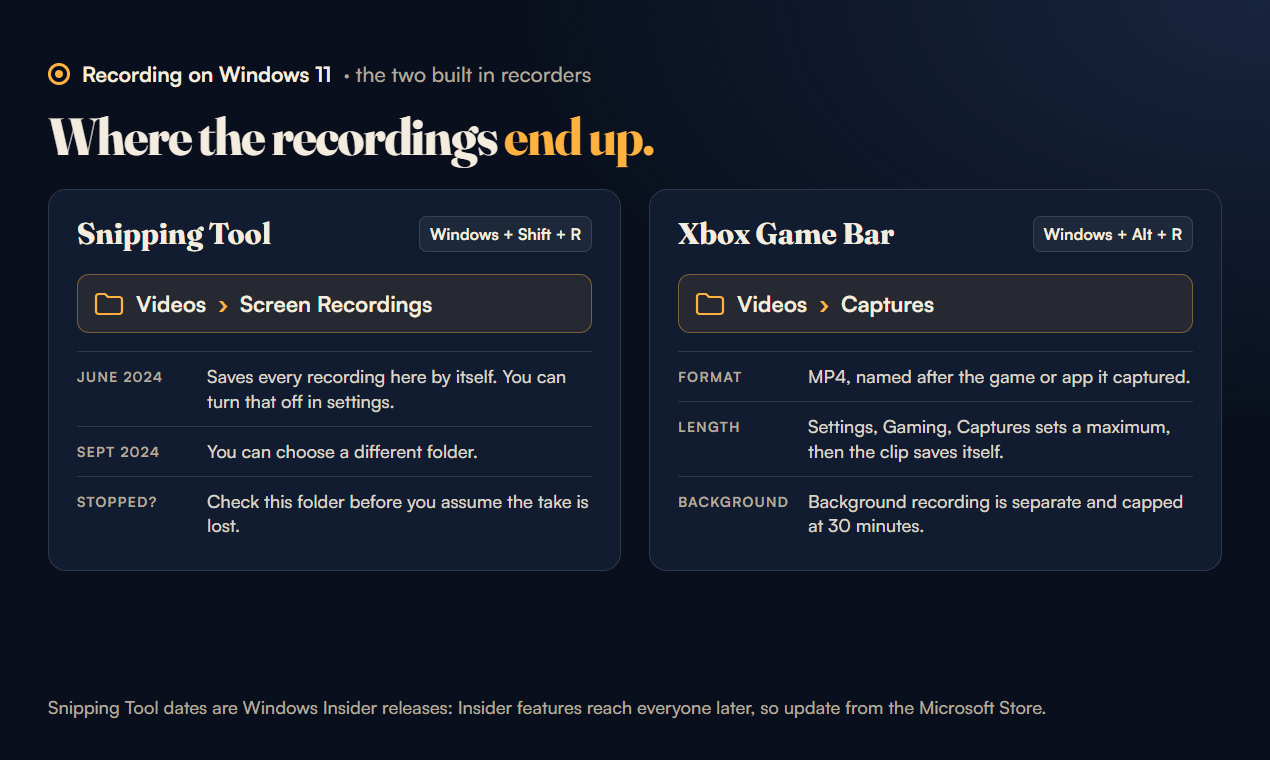
- June 2024: recordings save automatically to a Screen Recordings folder inside Videos, and you can turn that off in settings (Windows Insider Blog). From September 2024 you can choose the folder (Windows Insider Blog).
- February 2025: trim the start and end of a recording (Windows Insider Blog).
- June 2025: GIF export, limited to 30 seconds (Windows Insider Blog).
- August 2025: window mode, where the recording area matches the app window you pick (Windows Insider Blog).
Insider features reach everyone later, so if yours is missing something, update the app from the Microsoft Store.
Is there a time limit?
Here's where it gets messy.
- "30 minutes." On Microsoft Q&A, someone recorded for two hours and found "only 30minutes of the video is recorded". The reply, from an Independent Advisor (a volunteer, not Microsoft staff), says "It has a built-in limit of 30 minutes for video capture." No answer was accepted (Microsoft Q&A, July 2024).
- "No limit." How-To Geek says "there's no time limit" (How-To Geek, January 2025), and Kevin Stratvert says it "does not have a specific time limit, but it is primarily designed for short recordings" (Threads, October 2024).
- Microsoft's own pages don't mention a recording limit at all. The only 30 in its posts is the 30 second cap on GIF export.
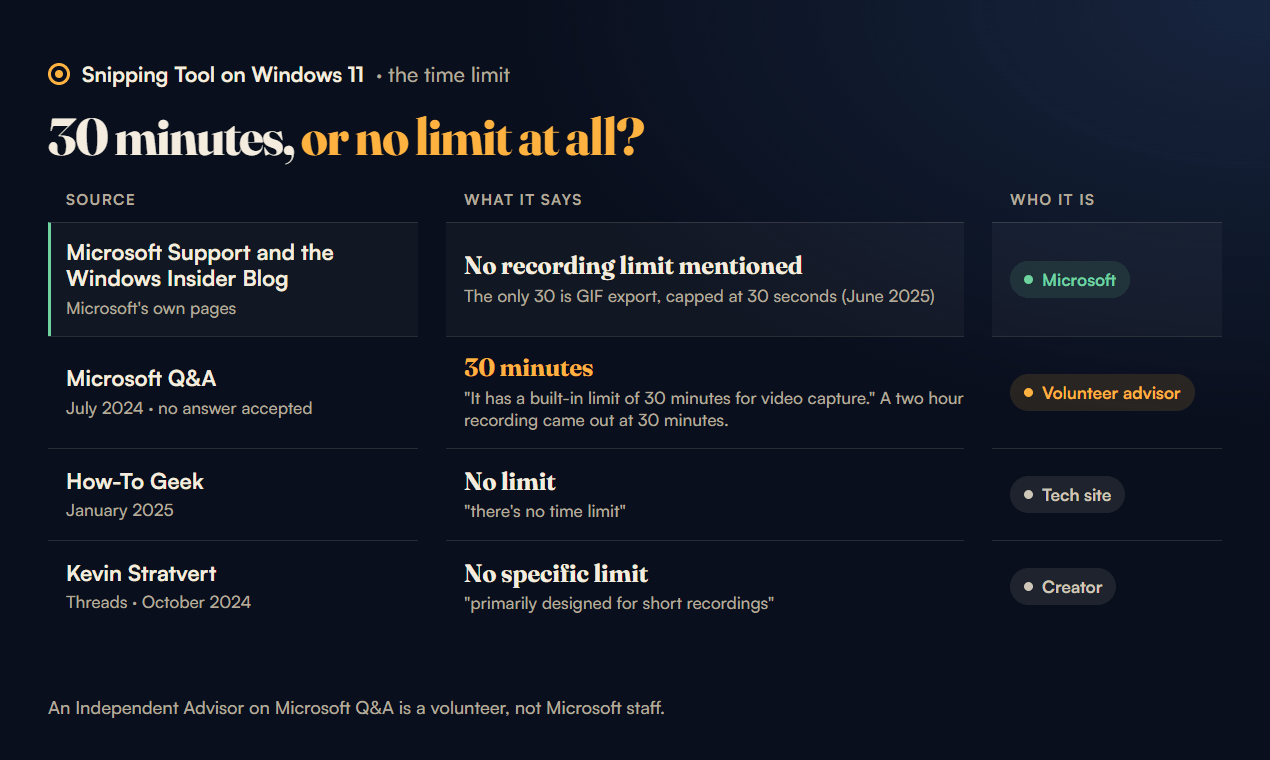
With no official answer, the safe move for a long recording is takes under 30 minutes, checking each one in the Screen Recordings folder before you start the next.
Why there's no audio
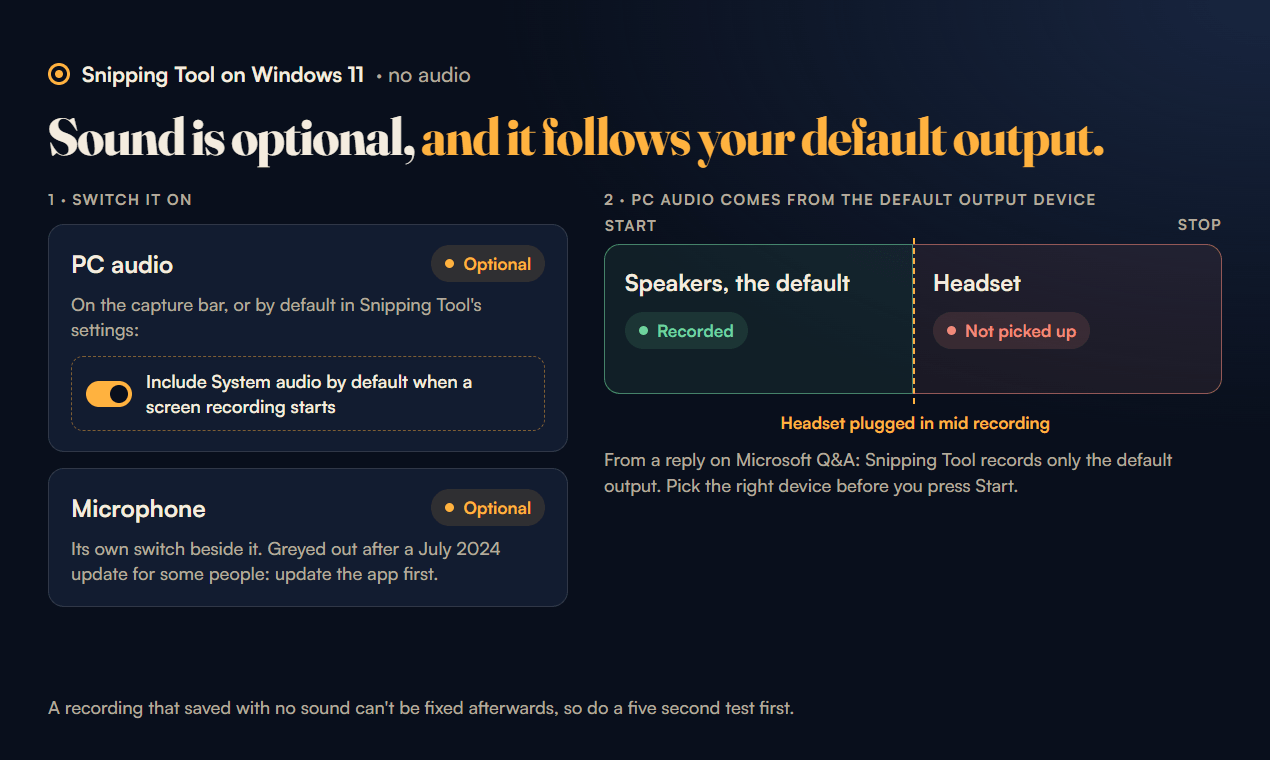
- Check the settings. Audio is optional. Open Snipping Tool's settings and look for the option to "Include System audio by default when a screen recording starts", and the microphone one beside it (Microsoft Q&A).
- It follows your default output device. A reply on the same thread says Snipping Tool records only the default output, so plugging headphones in mid recording isn't picked up. Set the output you want as the default before you press Start.
- A greyed out mic turned up for some people after an update in July 2024 (same thread). Updating the app is the first thing to try.
If a recording saved with no sound, there's no getting it back, so do a five second test first.
Why it won't record, or stops
- No Record option, or Windows + Shift + R only takes a screenshot. A volunteer advisor on Microsoft Q&A says the app should be version 11.2601.20 or later, and to reinstall it from the Microsoft Store if not (Microsoft Q&A, April 2026).
- The app disappears or crashes when you press Record. Repair it, then reset it if that doesn't help: Settings, Apps, Installed apps, Snipping Tool, Advanced options, Repair (or Reset), then check the Store's Library for updates (Microsoft Q&A).
- Some windows record as black. Windows lets an app protect its windows from capture. With one setting the window "appears with no content" in a capture, and with the other it "does not appear at all" (Microsoft Learn). That's on purpose: on Microsoft Q&A, Netflix showing up black was put down to DRM (Microsoft Q&A). No recorder setting gets round it.
- It stopped partway. Check the folder before you assume the worst: since mid 2024 recordings save themselves to Videos, Screen Recordings unless you turned that off.
Xbox Game Bar, the other built in recorder
If Snipping Tool is giving you grief, Windows has a second recorder:
- Windows + Alt + R starts and stops it; the screen flashes at each end (Xbox Support).
- Settings, Gaming, Captures sets a maximum recording length, after which the clip saves itself. Background recording is separate and capped at 30 minutes.
- Files go to Videos, Captures as MP4, named after the game or app (Microsoft Support).
- Some games block it, and if a recording doesn't end properly Microsoft suggests restarting Game Bar (Xbox Support).
It's built for games, and each clip is named after the game or app it captured.
The quick fix list
- No audio: turn on system audio and the mic in settings or on the capture bar, set the right default output before you start, and test five seconds first.
- Record missing or crashing: update from the Microsoft Store, then Repair, then Reset.
- Black window: the app is protecting itself from capture. Nothing to fix.
- Can't find the file: Videos, Screen Recordings, or the folder you chose in settings.
- Long recordings: split them into takes under 30 minutes, where the reported stops happen.
When you need more than a plain recording
Snipping Tool is great for a quick clip. If what you're making is a demo or a tutorial and you want zooms on your clicks, a bigger smoother cursor, or a 9:16 version for Shorts, that's what I built Framok for. It records system audio and your mic, and does the camera work in the editor afterwards. It's $29 once or $5 a month, Windows 10 and 11 only, and there's no free version, so Snipping Tool is still the right call for a quick capture.
What's the longest you've recorded in Snipping Tool? Curious whether anyone else has hit a wall.
Sources
- Microsoft Support, Use Snipping Tool to capture screenshots
- Windows Insider Blog: screen recording (8 Dec 2022), audio and microphone (31 Aug 2023), automatic saving (14 Jun 2024), choosing the folder (30 Sep 2024), trim (28 Feb 2025), GIF export (19 Jun 2025) and window mode (15 Aug 2025)
- Microsoft Q&A (community answers, not official): 30 minute recording, no audio, no record option and app disappears and Netflix and DRM
- How-To Geek, Snipping Tool features you need to know, 12 Jan 2025, and Kevin Stratvert on Threads, 3 Oct 2024
- Microsoft Learn, SetWindowDisplayAffinity, updated 1 Jul 2025
- Xbox Support, Record game clips with Game Bar and Troubleshoot Game Bar; Microsoft Support, record your screen with Game Bar